No window to go find
The companion rec script records a slurp-selected region or a whole monitor, and hands the file straight to recview when you stop. Nothing to open, nothing to name, nothing sitting in a folder you forget about.
rec --toggle
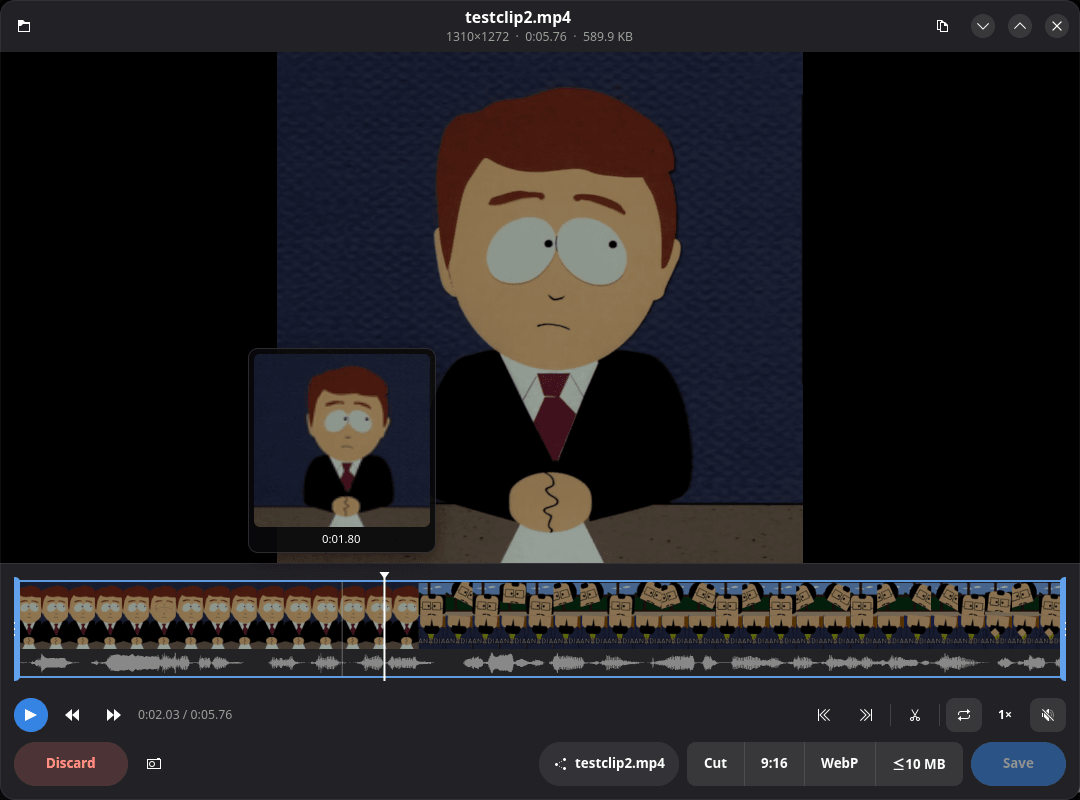
Stop the capture and the clip is already on screen, decoded on the GPU. Scrub it, trim it, crop it, then keep it, export it, or send it to the trash — every action is a button you can see, and what comes out is ready to post.
install + first clip
cargo install recview                         # crates.io · or a binary from Releases
git clone https://github.com/guitaripod/recview
install -Dm755 recview/rec ~/.local/bin/rec   # the capture script

rec                                           # pick a region, Ctrl+C to stop
rec --toggle                                  # bind this to a global shortcut
recview clip.mp4 # or just open a fileThe companion rec script records a slurp-selected region or a whole monitor, and hands the file straight to recview when you stop. Nothing to open, nothing to name, nothing sitting in a folder you forget about.
Dragging the playhead seeks on keyframes so the picture keeps up with your hand; letting go settles on the exact frame. Playback is libmpv rendered into a GTK4 GLArea with hardware decoding, so 4K stays smooth instead of pinning a core.
40 filmstrip thumbnails and the audio waveform drawn under them, so a cut can follow the sound. Hovering pops a thumbnail and timecode. Drag the in/out handles and the selection loops sample-exactly inside mpv while you refine it.
Draw a rectangle over the video with rule-of-thirds guides, move it, or pull any corner. It maps back through the letterbox to even-numbered source pixels, because every encoder here is 4:2:0.
Cut copies the selection losslessly. 9:16 renders a vertical 1080×1920. WebP makes an animated copy. ≤10 MB sizes itself for a chat box. Save re-encodes trim and crop over the original and trashes the old file. No menus — they are buttons on the surface.
Every MP4 preset writes H.264 High in limited-range yuv420p with AAC-LC stereo at 48 kHz and +faststart, fitted inside 4K without upscaling, and starting at timestamp zero. X accepts AV1, Opus or a late timeline and then silently fails to process it — so nothing here emits one.
Cut: stream copy · -avoid_negative_ts make_zero · instant, keyframe-accurate in-point
9:16: NVENC H.264 · scale + centre crop to 1080×1920 · AAC-LC 160k
WebP: libwebp_anim · 24 fps · 900 px wide · looping, silent
≤10 MB: NVENC H.264 CBR · bitrate solved from a 9.5 MiB budget · AAC-LC 96k
Save: NVENC H.264 -cq 21 · fits inside 4K · replaces the original via trash
Every MP4: H.264 High
· yuv420p limited range · bt709 · AAC-LC 48 kHz stereo ·
+faststart
Transport: Space or K play · ←/→ one second · Shift+←/→ or , . one frame · J/L slower, faster
Edit: I / O trim to the playhead · C crop · R reset · M mute
Out: Ctrl+S or Enter save · P copy the frame as PNG · Ctrl+C copy the file · X or Delete discard
For three of the five exports, yes — Save, 9:16 and ≤10 MB encode with h264_nvenc and there is no software fallback. Cut is a stream copy and WebP goes through libwebp, so both run on any GPU. Playback uses mpv’s hwdec=auto-safe, which picks whatever your machine offers.
recview itself is a plain GTK4/libadwaita app and opens any file you point it at. The rec capture script is the Wayland-and-KDE part: slurp for the region picker, wl-copy for the clipboard, and kscreen-doctor to read your refresh rate (it falls back to 60fps when that is missing).
Only for rec. recview opens any video file — pass it a path, drop it on the desktop entry, or wire it into whatever recorder you already use.
It is a computed target, not an enforced ceiling: the bitrate is solved from a 9.5 MiB budget minus the audio, with a 300 kbps floor. Selections past roughly three and a half minutes hit that floor and come out larger.
No — it copies packets, so the in-point lands on the nearest preceding keyframe and the crop is ignored. That is the trade for an instant, generation-loss-free export. Use Save when the frame matters.
The re-encode is written first and only replaces the original after ffmpeg exits cleanly; the old file goes to the system trash. Where trashing is not supported it is kept as a -original sibling instead. Discard sends the whole recording to the trash and closes the window.